


Using AI effectively can be confusing.
Just selecting a family of models to use, and pay for, is an non-obvious task.
If you want to actually leverage it to its fullest, add on top the choice of platform through which to access the model; to give it eyes and hands to do things for you. From Claude Cowork to Microsoft Copilot, Codex, ChatGPT for Work, Claude Code, and a bunch more.
Now, we got an entirely new product category too: personal agents. Grok Bot, Dot, Muse, Instinct and more to come.
After that, you have to think about the best way to adapt it to your work, personal wants, taste, context and files.
Ideally you would also like to access it from everywhere, without interruption, and have it work in the background without you watching.
And...make it so it has some sort of durability. To time, model upgrades and tool changes.
Because this is daunting for most, I put together The Workshop Series.
Not as a description of a personal setup, or a list of specific tools; but as a framework. A way of thinking of it as a composable studio. Following along the structure of a 500-year-old setup.
Now finished and available to you in full in one piece.
This piece.
A useful way of using this article is to just paste it into your AI platform of choice
and ask:

"Read this guide and help me setup my agentic system in a way that follows it.
Ask me along the way for my specific needs and wants in terms of specific tools.
Also document it accordingly."
The Workshop Series - Building a studio of capable machines
A 500-year-old setup
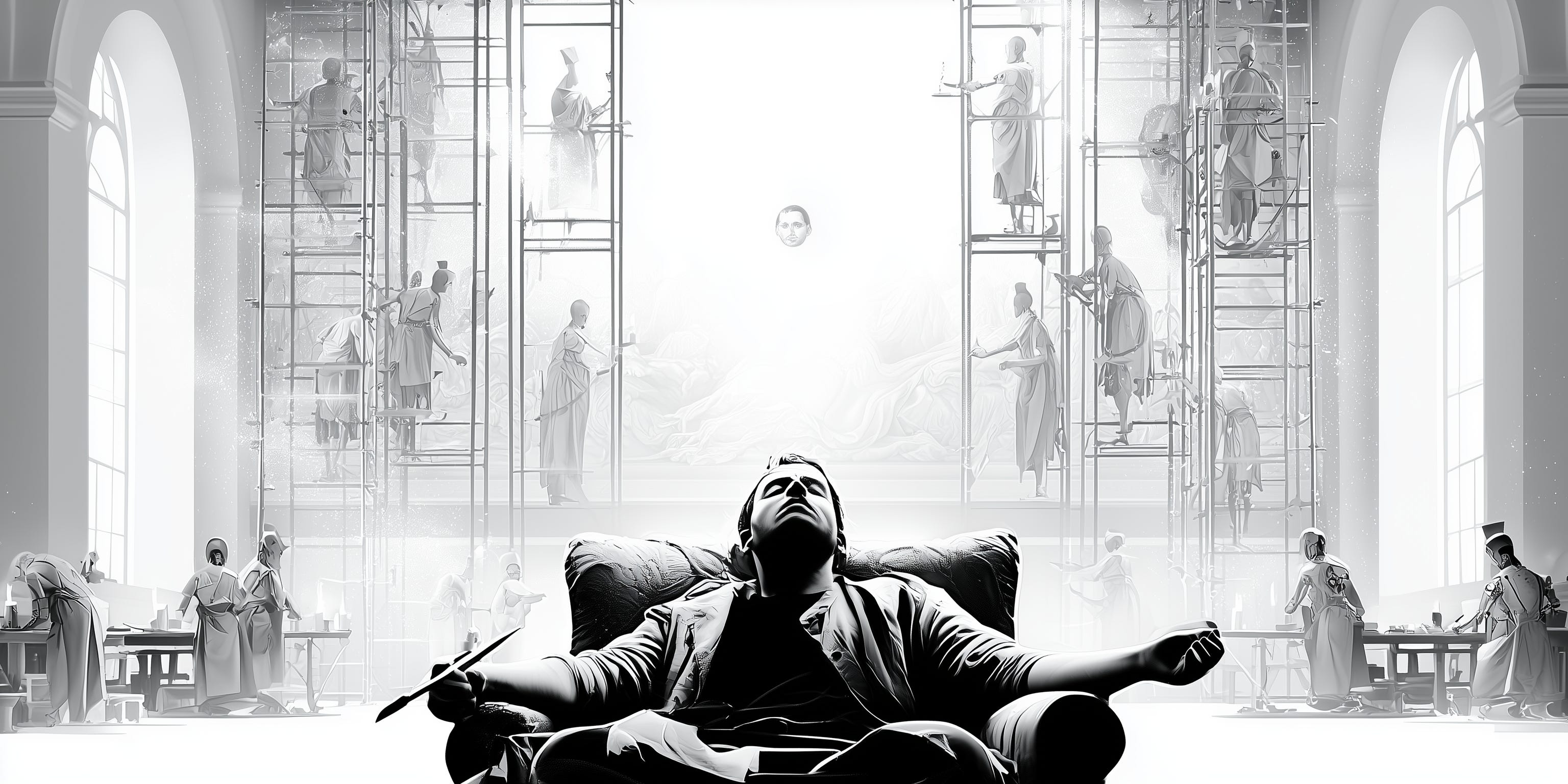
Around 1515, the painting master Raphael was running the largest workshop in Rome, designing more than one man could work on. The Sala di Costantino in the Vatican, one of his masterpieces, was finished after he died by his assistants, working from his designs. The commission and the name of the author held.
Long before corporate stole its meaning, a workshop (or bottega) used to be exactly this: a professional studio where artisans and assistants executed the work under the master’s direction and name.
The master planned and sold the works. Also, painted the faces and the hands, while assistants did the drapery, the backgrounds, and the gold touches.
The workshop was the arrangement that let an individual’s judgment, taste and expertise govern more work than one person’s hands could reach.
That mental framework is now the best mirror I found for working with AI. Long-form writing, thinking, reading: the faces and the hands. Those stay mine.
Much of the rest (drapery and backgrounds) is delegable now to capable agentic systems. In this summer series, four pieces will describe my current agentic studio. The stack that helps me delegate work to AI effectively.
Welcome to the Workshop Series.
The journey and the principles
I work ON AI. The team I lead designs and builds custom agents inside banks, fintechs, payment processors, and merchants across Europe. On my own time, I build stuff to find the cutting edge and places where the technology goes.
Naturally, we work WITH AI too, and through the last three years I tried and extensively tested most of what was launched: the lab apps (ChatGPT, Claude, Gemini, Grok), the answer engines (Perplexity, Copilot), the coding agents (Claude Code, Codex, Cursor, Windsurf), and the hyped harnesses of each season (OpenClaw, Hermes)
With those, a sediment of plugins, MCPs, CLIs, APIs, skills and prompt sets that have been appearing, stalling and disappearing.
Many weekend hours were spent on building setups around all this. Most of which have been dismantled, alongside the sophisticated workflows they powered.
This seems to be a pattern in the way some internet power users use AI: see an impressive demo and decide to reorganize your workflows around it. Then, it consumes more time than it saves or the thing hasn’t been touched at all. The novelty doesn’t bring actual usefulness to it. They were built for a different person
After all those hours invested in building and retiring setups, I now came to what I believe to be the sweet spot in terms of my personal and professional AI stack. A setup built around a few organising practical principles instead of depending on the launch of the week. A list of rules that matter more than any tool:
Always-on. Multiple agents can take long-running and overnight tasks without a domestic laptop lid or computer halt deciding their fate. A secure environment to which direct work 24/7.
Accessible everywhere (and synced). The same agents reachable from every device and form factor I use: an IDE at the desk, a terminal on a phone, a native app in an airport queue.
Composable. Using the principles of the division of labor, the plain models shouldn’t be responsible for everything. Skills, plugins, MCP servers, CLIs, subagents, even models from other labs, curated once and available to every agent.
Portable. The whole arrangement owned by me, customizable and movable. The library of documentation, files and long-term memory too. If I switch to Codex or Hermes tomorrow, tall these should come along with minimum effort.
Robust. The setup had to be secure, have a great uptime, prevent any leakage and provide absolute isolation of profiles. It also needs to be controllable (tasks done with or by an agent should be traceable, recoverable, and monitored) and upgradeable (both the environment and the agents’ models should evolve with the frontier
Five Layers
The setup those rules ended up generating has five layers. Again, five.
Each can map to a part of the old workshop, and each gets its own deep dive in the coming weeks: rationale first, tooling second, because the principles might survive the year and the software most likely won’t.
1. Models & agents
The master’s assistants.
After much trying, the seat at the center belongs to Claude Code, on both sides of my life, because I came to conclude that it has all what Openclaw promised, but better.
Professionally, it runs contained, on enterprise infrastructure, touching only the files and actions it’s permissioned for. Personally, it lives on an always-on server with wide access, bypass permissions, scheduled jobs and room for experiments. Same tool, two profiles.
Everything the hyped harnesses promised, an assistant that actually does things with files, shells, long-held memory, browsers and schedules, is actually available in a native tool that has been catered to developers.
Claude Code also provides a very wide and deep set of multi-agent primitives. From ad-hoc workflows that spin up a set of agents adapted to a specific ask to custom definitions that allow the creation of specialist agents for repeatable work to teams of agents.
Codex is a genuinely great alternative, and the GPT-5.6 family made it better; I stay for Anthropic’s release rhythm and the tool’s professional-ish behaviour.
For now. The setup would deliberately survive the change.
2. Custom harness
The workshop’s bench.
In What is an AI agent, anyway, I argued that everything around the model that isn’t the model is the harness: the tools, the memory, the permissions, the loop. So, Claude Code is by definition a capable out of the box.
The interesting work starts when you treat it as the baseline to build on rather than a product to accept.
Mine lives on a portable repository: rules, skills, plugins, agents, hooks, MCPs, CLIs, reference and configuration files. Versioned and installed on different machines by one script.
Anything that proves useful for a professional project (a documentation skill, a review workflow) is probably useful for professional work the next day, because both profiles draw from the same bench.
This layer is the richest of the series, and it goes first.
3. Environment
In the professional set, an enterprise-grade and isolated environment. Locally on my corporate device. In my personal setup, my agents live on a small virtual private server that can grow with the demands.
Pieter Levels has been loud about this pattern, agents belong on a remote VPS rather than your laptop, and he’s right for many reasons: security, access, speed, reliability and upgradeability among others.
Some mornings I open a terminal (on my iPhone with Termius) over coffee and find the night’s work filed: a research sweep completed, a small app live, a draft for a model delivered for my review.
Raphael died and the Sala got painted anyway. I sleep, and the drapery gets done (get over the lack of modesty please :)).
4. Vault
The workshop’s library.
Renaissance workshops kept model books: drawings, patterns and studies that assistants consulted so the work stayed coherent across many hands. My version is an Obsidian vault, 2,400 notes and counting, synced across every device I own. The agents treat it as a library in the strict sense: consulted on demand, never loaded wholesale.
Inside it sits a dedicated workspace that functions as the shared desk between me and the machines. Briefs go in, drafts come out, context accumulates. Long-term memory lives here too, which means it survives any individual tool. The library is built to outlast the bench.
This last bit, inspired by Ruben Hassid’s work with some modifications and adaptations that make it more durable and robust for me.
5. Everything else
All workshops, modern or ancient, have a wall of small tools that didn’t make it into history books. This one is no different, but I will document it.
Mine holds VS Code (the IDE on both profiles), Termius (a terminal on an iPhone, a strange thing to love), Tailscale (the private network that makes the studio reachable to me and invisible to everyone else), Monologue for dictation, because agents thrive on detail and speaking produces far more of it than typing, and Microsoft Copilot at work (much improved with the GPT-5.6 models; in my view still an agentic generation behind).
The wall is secondary by definition but very important in practice. it sets whether the setup is pleasant to use, which sets whether it gets used.
The agentic setup walkthrough would be incomplete if I did not mention the software and tools that make the experience of interacting with it fast, easy and always-on.
Up next
I am aware that a setup with this many named layers sounds like productivity theater.
I would say it is minimalistic. Only what has survived three years of testing, setting up, making mistakes and dismantling
In any case, I keep an eye out for opportunities to keep simplifying. More focus on removing than in adding.
Today, this is my map: the assistants, bench, buildings, library and tool wall. Four deep dives follow, one layer at a time, each one opening the hood on the principles and the specifics.
The Workshop Series - Building the harness
Part 1: Anatomy of a portable tool set

In the last article, I described why the renaissance workshop was the best system to mirror when working with AI agents, personally and professionally. That piece, as the intro for this series, also mapped my own setup as five layers with a promise to go into each in detail.
This is the deep dive on my agentic studio bench: the curated and portable configuration that upgrades any machine with Claude Code (or any coding agent) and makes it mine within five minutes.
Welcome to The Workshop Series, Part 1.
Claude Code has a marketing problem
Claude Code has the center seat in my setup, because it is the most robust and capable platform to build true AI assistants today. It just has a naming and marketing problem (OpenAI’s Codex has it too; that is why they created ChatGPT Work).
OpenClaw went viral because it showed the world what an AI that actually did things was like. It was also marketed as a real AI assistant and, at times, it truly felt that way. All built by a single individual.
The hype around it has since cooled off because of reliability, context bloating, memory management and cost issues.
I did test OpenClaw too but, throughout, I couldn’t stop thinking that the official coding agent systems created by the labs had access to even better capabilities: they can operate a computer, manage files, connect to external tools, handle a tiered memory system and run overnight unattended.
So, why didn’t anyone pay attention to these and go crazy over OpenClaw instead?
The answer is perception. Claude Code is named and marketed as a tool for developers whereas OpenClaw and Hermes are positioned as personal AI agents. They are also invoked via messaging apps while the “coding” agents live naturally on a computer terminal (with its white-over-black look).
This is intimidating for non-technical people. If and once you get past that, it is the most stable, well-engineered harness around which to build your own team of synthetic artisans.
The out-of-the-box Claude Code is generic, though. It doesn’t know my context, memories, life domains, projects, identity or communication preferences. It is also clueless about how I like to communicate and work, the tools and software I use or how I like things done.
To close that gap, I have been building my own harness on top of the harness. A private repository that keeps evolving, that can be cloned into every computer, and that wraps the plain coding agent platform to make it into my own AI studio.
1. Instructions: what the model always knows
This is the base layer that loads into every session, regardless of the project or the device. Currently, it holds one core context file (CLAUDE.md) plus nineteen rule files. They handle my needs and wants for every new session (overall identity and communication style) and specifics I want to be triggered depending on the type of ask (development, knowledge work, design...).
Global
CLAUDE.md(global): The backbone: how the config is organized, the one hard rule on secrets, the self-improvement loop.communication.md: How I want to be communicated to: directness, Simplified Technical English, decision-support structure, the banned-jargon list.capability-routing.md: Which skill, agent or plugin for which job, across ~110 skills and 10+ agents.design-system.md: My own visual identity across software, tools, diagrams, documents, decks and generated images: Atelier.workflows.md: The way I like to work across areas: plan before building, subagent strategy, verification before “done”, revision strategy.
Specific
image-generation.md: Where generated images land, and why the routing is a hook rather than a habit.development/*: 7 different rule files that govern software development and coding projects: from tool selection to testing discipline and stack defaults.work/*: 4 files that introduce discipline around research, citations, document structure, verification and document management.chief-of-staff/*: 2 files that trigger specifics when working with email, messaging, cloud drives etc.
These 20 files load in every new session and pay a token tax (about 7,600 today) before the assignment even starts. Worth it.
The five global files are detailed instructions that govern how I want agents to work, and how I want to be worked with. The other fifteen guide my agents to activate certain mechanics, depending on the nature of the task. In other words, these files are triggers, not detailed guides.
Also important to understand is that the system of CLAUDE.md files acts as an instruction cascade. A user-level CLAUDE.md loads in every session whereas you can create others at project and folder levels, which load upwards, effectively creating a tiered rules system. Several folders and projects in my setup have their own CLAUDE.md (for example, a pet project I am working on to create a way to connect coding agents to multiple models).
2. Reference: what it reads on demand
The folder that contains the long and specific knowledge that is read only when an agent needs it for the task.
It currently stores eleven files. Here are some examples:
about-me.md: Identity, family, life domains, financials and projects.editorial-style.md: My writing style, encoded. For article review and editorial check, posts and tweets.secrets.md: The secrets model and the per-device functioning.knowledge-work-plugins.md: The Product Manager and Design plugins, with the detail of what fires them.research-sources.md: Every paid subscription I hold and the permitted method for reading each.compound-engineering.md: How the/ce-*plugin is used for a software development or app project.gemini-image.md: Image-generation mechanics: install, auth, models, per-image cost.obsidian.md: My library instructions. The document vault structure and conventions.browser-testing-artifacts.md: The mechanics and tools to test in the browser.
The reference library extends much further than this portable configuration as the document vault, synced in Obsidian, is accessed by my agents on demand. Inside it, 2,400+ notes give ad hoc content to my system when pointed to or needed, never loaded wholesale.
3. Memory: lessons learned and the improvement loop
Claude (and other equivalent systems too) gives you a native memory system that is on by default and doesn’t need any setup. As Claude works, it writes notes for itself: one markdown file per fact, a MEMORY.md index on top, and automatic recall in later sessions.
However, this built-in memory has (at the time of this writing) two limitations:
Memory is per-project: a lesson learned in one folder or repository is invisible in the others.
It is local: these memory files do not sync across devices.
While these limitations last, I patched them with two hooks (more on those below) and a rule:
A trigger (
capture-lesson.sh) reads every prompt and, when the language looks like a correction, reminds the model at that exact moment to ask whether a durable lesson exists. If confirmed, a taxonomy classifies each memory into one of four types, and the type decides whether it travels.A sync script (
sync-memory.sh) runs at session start, carrying the portable types through the config repo to every project on every device.
4. Tools: what gives my agents capabilities
Four different primitives give my agents skills and hands.
Skills. A skill is essentially a folder with a Markdown file inside that contains instructions for one type of job. Formatting a PowerPoint document. Auditing a codebase. Designing an ad. They can be written from scratch by you, borrowed from others (there is a huge offering of skills by creators) or created with the assistance of AI (the official ‘/skill-creator’ by Anthropic is really high-performing).
I currently use 82 (both mine and adapted), grouped by discipline.
development/:deep-review,dependency-audit,pr-prep,handoff,project-bootstrap,output-skill.design/:atelier-design(my design system), five interchangeable style skins,redesign-skill,emil-design-eng,taste-skill.chief-of-staff/: Vault work:obsidian-cli,obsidian-markdown,obsidian-bases; Email management:gmail-mgmtn.finances/:analyze-asset,analyze-balance.
What makes this number of skills usable is a property called progressive disclosure: at startup only each skill’s name and description load. The body loads on invocation, and bundled files load only if the body calls for them.
They can be invoked directly (via a slash command) or by an agent, based on the description.
MCP servers. While a skill adds knowledge and procedure to a model, MCP gives it hands. The Model Context Protocol is an open standard for connecting AI applications to external systems. And an MCP server is a small process that exposes a system’s operations as tools the agent can call directly (query the database, access this information, change this data, drive this browser). They give the agents access and reach.
A sample of the MCPs living on my setup:
context7: Current library and framework docs. Beats guessing from training data, and beats web search for API syntax.cortex-scout: Deep research, multi-source web search, and authenticated fetches through a persistent browser profile.playwright: Headless browser automation. The only browser tool that works on my server.chrome-devtools: Console, network and performance traces when debugging an app I’m building. Needs a display.pinchtab: Interactive local browser session. Needs a display.supabase: Postgres, the default data layer. Registered at user scope, so it carries account-wide write access and its own guardrails.netlify: Deploys. Backs the “make it live” default.nanobanana: Gemini image generation, wrapped so it reads its key from the vault at launch.Gmail: Gives it permissioned access to my personal Gmail accounts.Todoist: Allows my agents to manage my to-do list (and vice versa).
Plugins. A plugin is a set of skills, agents, scripts and MCP servers packaged as one installable unit. They are distributed through marketplaces (git repositories with a catalog file) and you can think of a plugin as a full workflow, versus a skill being one job.
I currently have fifteen running. Two created by me and run locally, thirteen from marketplaces.
as-editorial(mine, custom): A package with my tools for the newsletter. Research for articles, shape outlines, editorial reviews, promotional copy...as-design(mine, custom): Visual asset creation: images, infographics, diagrams, social media assets etc, based on my design system.compound-engineeringby Every Inc: An awesome plugin by Every that governs software development excellently. Highly recommended.impeccableby Paul Bakaus: 18 frontend polish commands.document-skillsby Anthropic:pdf,docx,pptx,xlsxmanagement.product-management,designby Anthropic: PM and design workflows that fire on prompt match.code-review,code-simplifier,feature-devby Anthropic: Review, tidy, and guided feature work.skill-creator,claude-code-setup,agent-sdk-devby Anthropic: Building and evaluating new capability.typescript-lsp,pyright-lspby Anthropic: Language servers.ralph-loopby Anthropic: Recurring prompt loops.
CLIs. As coding agents are very proficient at using the command line, the Command Line Interface is one of the most robust ways for them to interact with third-party software and services, without being agent-specific.
Currently, five are reachable by my agents:
defuddle: Clean markdown out of a web page, without a browser.gemini: Hosts the nanobanana extension that the MCP server is built from.netlify: The login that the Netlify MCP reads its credentials from.gh: Git repository management.obsidian-cli: Obsidian vault management and document handling.
5. Agents: the delegation system and specialists
Within a session, Claude provides four different native methods to assign work to agents.
Agents (general-purpose): The main agent (the one you interact with) can spin up subagents on demand and in the background, for a single ask, returning the result to the one that spawned them.
Specialized Agents: You can define (or borrow) your own specialist for recurring or complex tasks. A subagent definition includes detailed instructions, behavior, tools, model and permissions.
Agent teams give each worker its own session, a shared task list and direct peer messaging.
Dynamic workflows hand the control flow to a script instead of a model: agents do the work, code decides what runs when. A workflow is a JavaScript script that orchestrates subagents: the script holds the loops, the branching and the intermediate results, and the agents just do the work.
As frontier models get better, the need for specialized agents is arguably diminishing. However, I still find them more robust and, most importantly, consistent for certain types of tasks and projects.
These are a few of my specialized agents within the portable setup:
chief-of-staff(Fable): Strategy, planning for other agents, delegation, workflow creation.payments-expert(Opus): A specialist agent acting as an advisor in the payments and financial services industries.financial-advisor(Opus): Portfolio review, Spanish tax planning, mortgage and scenario modeling. Reads the live balance sheet rather than carrying facts in its prompt.visual-designer(Opus): Visual asset design, design system improvements.software-architect(Fable): Architecture soundness, schema changes, technology selection.fullstack-engineer(Opus): Executing an architectural plan end to end.ai-engineer(Opus): AI system design and production deployment.security-auditor(Fable): Compliance posture: SOC 2, GDPR, PCI, ISO 27001.
On top of these agents sits one shared capability. Define it once, and every form of delegation (including teams and workflows) can reach it.
6. Hooks: how rules are enforced
A rule is text in a context window, which the model may follow, or not. It can forget it under memory pressure or find it outranked by a competing rule.
However, a hook (a small script that executes automatically) runs at a specific point with no room for interpretation. The memory triggers in the third section are one instance of this.
Anything that must happen deterministically runs as a hook, and anything that benefits from judgment stays a rule.
Hooks currently in my setup:
capture-lesson.sh, fires on every prompt: Detects correction-shaped language and re-injects the capture instruction at the moment it applies, not at session start.sync-settings.sh, fires at session start: Merges the shared config into the device-local settings file that Claude Code writes to at runtime.sync-memory.sh, fires at session start: Mirrors feedback and identity memories across all three machines, and leaves them uncommitted for review.mirror-reference-to-cowork.sh, fires at session start: Copies the identity and voice files into the vault, so Claude desktop reads from one source of truth.nanobanana-route.sh, fires after any image call: Moves generated images out of the staging folder the server hardcodes, into the project or the vault, and slugifies the filename.atelier-verify.sh, fires after every edit or write: Checks the change against the design system.headless-guard.sh, fires before any display-bound browser call: Denieschrome-devtoolsandpinchtabon a machine with no display, and tells the model to re-plan with the headless browser.
The bench evolves, shrinks and travels
The anatomy of my custom harness, as described, grows and shrinks.
Every quarter, a scheduled cron job runs an audit that checks the level of usage of the different primitives (skills, plugins, MCPs, etc.) and proposes to remove some.
Anthropic itself expects this to trend toward “letting intelligent models act intelligently, with progressively less human curation”, and every evolution seems to delete a layer of somebody’s setup. Mine will continue to lose layers too.
A more capable model makes the instruction layer thinner and the identity and taste layers ever more valuable.
The setup is built to travel across devices and environments.
Rules are Markdown, skills are folders with a Markdown file, agents are Markdown with formatted descriptors, MCP is a standard across models, and hooks are small shell scripts. Plugins are a combination of the above.
The whole bench is mostly text and code in one repository, and one script wires it into a new machine. It is also what makes it compatible with any agentic coding system if I decide to switch.
I hope this sparks your imagination to build your own AI workshop bench if you haven’t yet. I am planning to open-source my set once its last sharp edges are smoothed out.
The Workshop Series - House of agents
Part 2: The always-on environment where my digital assistants live
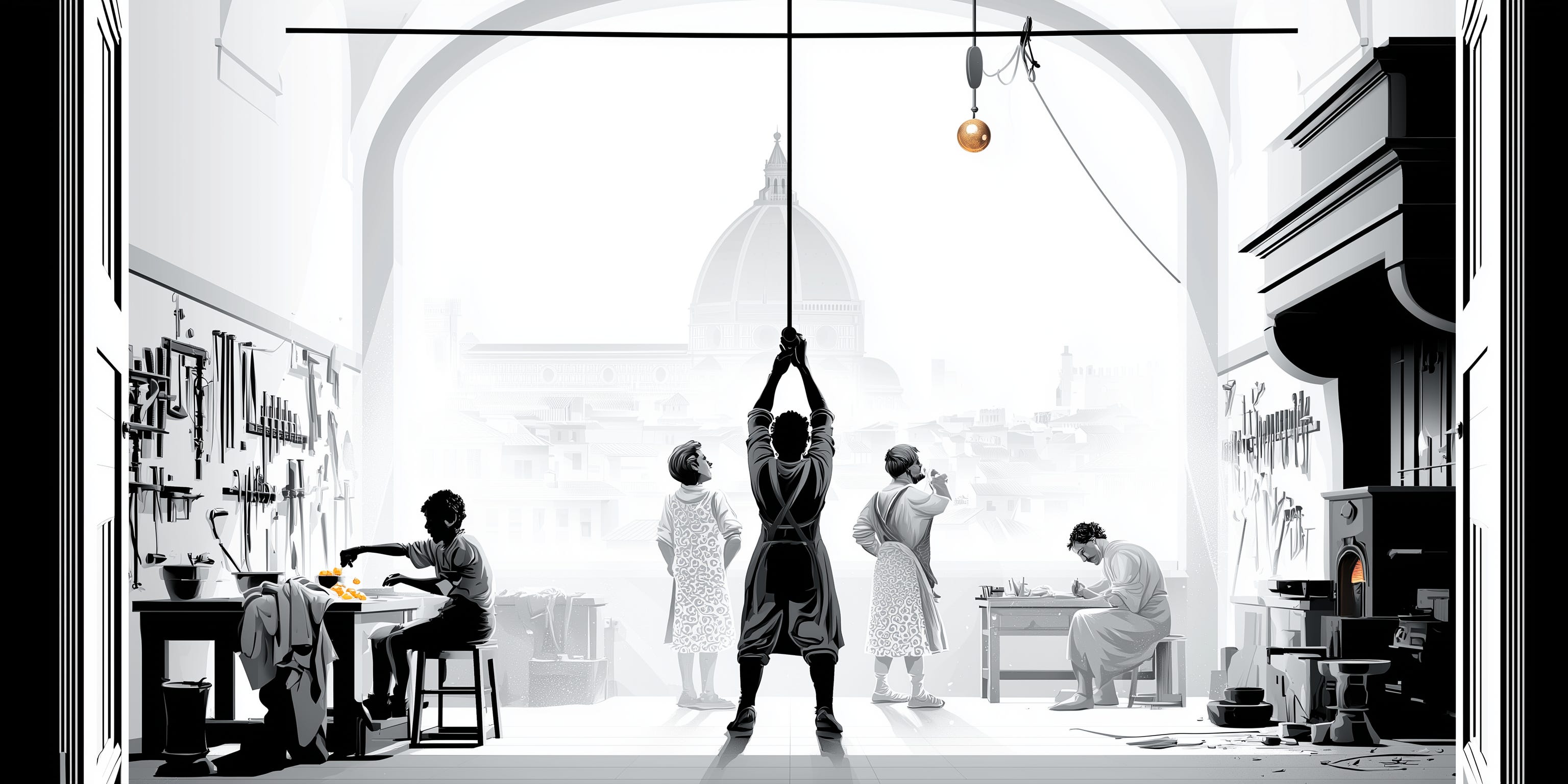
On a regular morning around 1471, Andrea del Verrocchio pushed open the door of his workshop in Florence with the low morning light coming in through the dusty windows. The smells came at him: workbench wood. Linseed oil. Hot glue, sawdust, and the cold ash of a furnace that had gone out overnight.
His artisans were already at it. A boy was separating egg yolks to mix paint. Two more stood with their hands behind their backs, arguing about how to hoist a gilded copper ball onto the cathedral dome. In a corner, a nineteen-year-old was finishing a small kneeling angel the master had handed him the way you hand off a chore. Leonardo was his first name.
That shop, somewhere near what is now Via Ghibellina, is where the work happened. A building with a furnace, a bench, and enough room for eight people to be busy at once.
Today, while the scene may not be as evocative and your (digital) assistants don’t yet have the genius of da Vinci, the metaphor still holds. Your agents need their place. To read, write, install, break things and keep going while you sleep.
And, unlik Verrocchio’s apprentices, they can work there around the clock, and you can reach them from anywhere.
Welcome to The Workshop Series, Part 2.
1. The agents’ building
My agentic bottega is a small Hetzner virtual private server: four vCPUs, 8 GB, 80 GB of disk, headless Ubuntu, running for about 100 days now nonstop, a little under €13 a month (including backups).
Agents are very good at the command line, and a Unix-based system is mostly config files and CLI tools, which is also the cheapest interface in tokens. So I gave it Linux.
Its timers start firing at 8 AM, so most mornings a couple of emails are already waiting in my inbox with a brief on what happened through the night and the latest developments in AI.
I can then kick off the creation of an MVP for a new idea in the desktop terminal, asking a Fable agent to work through the plan. Later in the day, I review the plan on my phone using the Claude app, while on a coffee break, and instruct it to go ahead using a squad of subagents.
That night, a quick review of the implementation report in the iPad’s Termius app, to test it on my laptop again the next morning.
That is the kind of workflow the Mac mini buying frenzy was trying to accomplish by putting Openclaw on it to run 24/7. It is also what the labs now package into products like ChatGPT Work, Claude Cowork, Cursor Cloud Agents or, most recently, Grok Bot. A managed cloud environment that serves as the agents’ workspace. In essence, their own computer.
I argued last time that the labs’ coding agents were already the better assistant platforms, and that the gap was perception. These products are that recognition, aiming at the regular knowledge-work user.
Agents are only as capable as the environments they run in. […] Not setting up a development environment for your cloud agents is like not giving your engineers a computer. — Cursor, Cloud Agents documentation
While powerful and friendly (certainly much better than the previous chatbot platforms), they have a problem, and it is that they are...managed.
As such, they are someone else’s room. You don’t control the tools your agents can have access to. The installed software and tooling. Also, you don’t have a say in the rented workspace compute or speed. Nor in the session durability (these services usually build a fresh machine per job and discard it) or the full filesystem access.
For that, my choice is to rent my own virtual workshop for agents. You have other options, but mine gives you maximum flexibility and control, at the cost of some initial setup and minimal maintenance.
2. Secured to the external world
Most servers exist to answer other machines’ requests. A good virtual private workshop for agents should not. No website, no served database, no users in. Ideally, no way in from the open internet at all.
To reach it, a device first joins a private Tailscale network made up of my devices only. The server then requires a securely held cryptographic key (no root login, no password authentication) for SSH access.
Also, as an additional layer of security, the firewall rules on the server deny everything except my secure interface. On top of that, specific software blocks repeated failed login attempts.
On my iOS devices, Mosh prevents my connection from dropping when, for example, the network changes.
With this, I can access my house of agents through my laptop (via a terminal or VS Code), my phone (using Termius or an authenticated Claude app session) or my iPad, without ever losing the thread of the work or preventing agents from working in my absence.
Securing a small personal server takes about 20 minutes and should be the first thing you do if you take this route. If you want the details, just drop a message.
3. The machinery that runs while I sleep
A few tweaks separate a machine that’s always on from one that is usually on.
On Linux, anything you start is shut down when you log out. A couple of changes (Restart=always and loginctl enable-linger) turn that off. With them, the job that keeps my Obsidian notes in sync has run for months without stopping once, and the overnight agents keep going.
A combination of crontab and systemd timers runs scheduled workflows automatically, with specific settings that make them even more reliable:
If the machine was off when a job was due, the job runs once when it comes back, instead of silently skipping the day.
Each job holds a lock while it runs, so a slow one can never be overlapped by the next one starting (this is optional if your machine is powerful enough).
They all run at low priority, so they get out of the way of whatever I’m doing.
Finally, Claude Code runs a supervisor that refreshes the subscription token automatically. The agent’s credentials time out every few hours, which is the usual way an unattended machine quietly dies overnight. This renews them for me and keeps the digital assistants running.
4. Which agent is waiting for me?
Once you start to get comfortable with the terminal, you will come across different TUIs (Terminal User Interfaces) and tools that make work in them more pleasant and persistent.
To work with agents, Herdr is the gold standard, in my opinion.
Technically, it is a terminal multiplexer. A tool that lets one terminal window hold many independent terminal sessions, and keeps them running when you disconnect. Think tmux redone for the agentic era.
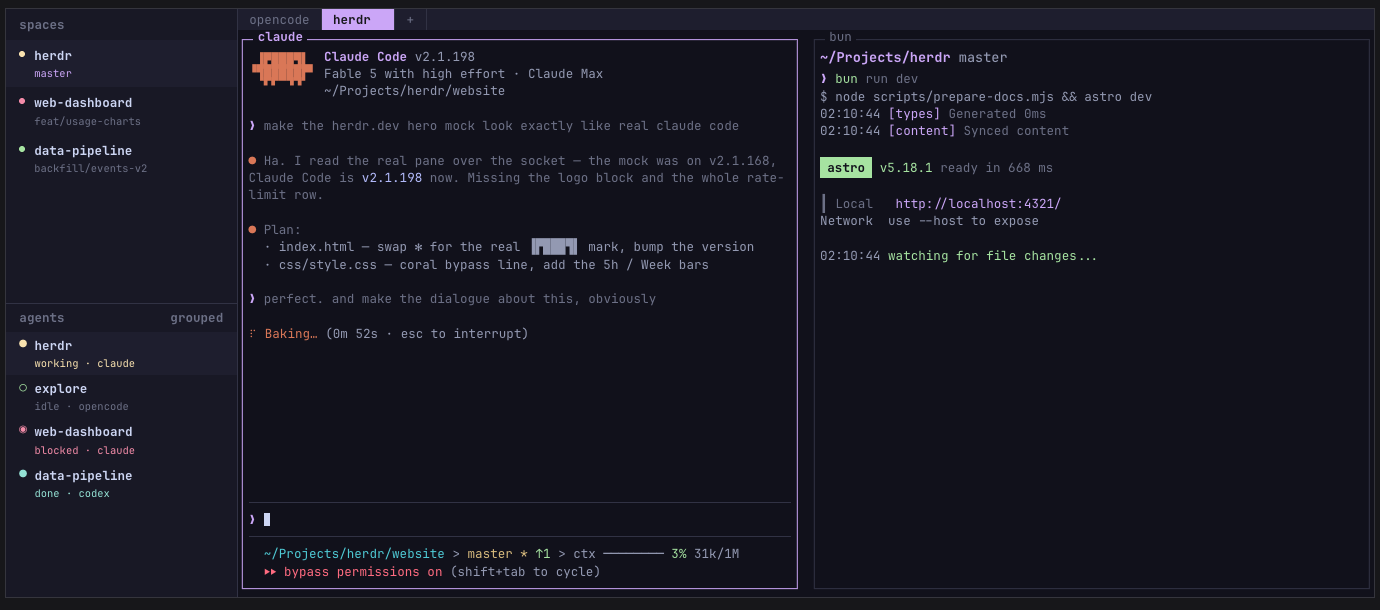
What sets Herdr apart is that, besides giving each agent its own real terminal, it tells you the status of every agent. It classifies each one as blocked, working, done or idle, and shows them in a nice sidebar so you can respond when needed or do parallel work otherwise.
It is also very configurable (you can set multiple panes) and has a growing community behind it, with plenty of plugins to add so it best suits you.
Your agents’ workspace
Your agents belong to and thrive in the cloud.
Getting your own small server to work with AI is not free. It needs setting up, some maintenance (although that can be agentified too) and a small fee. But Verrocchio’s shop was never free either. He paid for that building in charcoal and rent so his artisans could work efficiently.
The truth is that the labs will rent you the alternative, competently and with no maintenance. But at the cost of less control, flexibility and portability. It is a trade-off to consider.
I prefer to hold the deed and the control.
The Workshop Series - A library for humans and agents
Part 3: The shared vault and workbench

Renaissance workshops had shelves full of model books: replicas, drawings, patterns and sketches that helped the team of assistants produce work that was coherent across many hands and kept the style of the master.
A version of this has persisted through centuries in different shapes.
Architecture studios, engineering shops, fashion ateliers and design firms maintain their own playbooks, design systems, pattern books and portfolios. Among other things, these help speed up the creation of new work, enforce a specific style and ensure quality through time. And people coming and going.
Naturally, the modern versions of these are digital.
Enterprises maintain a (very imperfect) set of corporate wikis, knowledge management systems, intranets, shared notes and files in random places, all in an attempt to accomplish those same goals: share knowledge, maintain consistency, ensure quality and work faster.
As you add more humans, the thing gets really messy and becomes extremely difficult to maintain. Even more so to use. So much so, that it has given birth to an entire category of B2B SaaS.
For individuals, the beginning of the decade brought a new trend from the tech-pilled and personal-productivity crowds: the second brain. A personal knowledge-management system that favored the capture and organization of information as an interconnected web so finding it and using it later was more effective.
Don’t try to remember everything. Build an external system that captures, organizes, distills, and retrieves the information you need to think and act effectively. - Tiago Forte
Again, a plethora of new software tools accompanied this new trend: Evernote, Notion and Obsidian are probably the most prominent examples.
It turns out that AI makes these concepts much more powerful.
Your agents benefit enormously from having access to an information vault they can consult and work with, especially if its items are interconnected and - somewhat - organized.
Somewhat - because current models, and modern harnesses, are very good at retrieving and making sense of seldom classified and sparse information, making it easier to actually distill the information that is useful for the job and turn it into something usable.
In simple terms, your agents are half as useful without access to a shared library.
This piece, third of the series, describes mine. What the vault actually holds and the shared desk inside it where briefs go in and outputs come out.
Welcome to The Workshop Series, Part 3.
1. The library
The vault of documents, files and notes I now share with my agents is stored in Obsidian. Synced across my devices through its native synchronization system.
Around 2,300 items now. 82 MB. Most of them, simple markdown files.
It is - roughly - organized around PARA, the structure created by Tiago Forte (the guy who formalized the second brain framework): projects, areas, resources, archives.
The idea is that you store by how actionable something is rather than by topic.
This is what it looks like in practice:
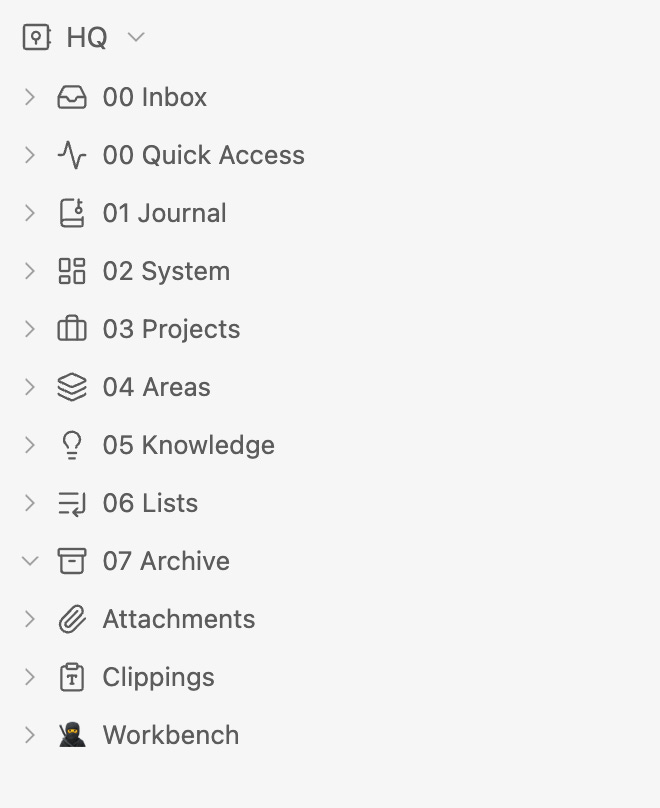
This is a system built primarily to be useful to me, from its inception to now. It turns out it is also the best shape for agents to read, write, edit and create.
I initially used Notion as my personal knowledge management system. Connecting my agents to it via its native MCP and exposed APIs.
While it’s a great product, very versatile, configurable and aesthetically pleasing, its interaction with my agentic harness is not as efficient. My agents have to continuously make calls to the tools (MCP and/or API), which introduces latency and consumes more tokens than reading or editing local files.
Obsidian works as a set of plain files and folders. Once it syncs, we humans use it through a curated interface built for us (the Obsidian app), but agents treat them as local files they can touch using plain terminal commands.
Faster, more token-efficient and less prone to errors.
It also gives agents a better sense of how the items relate to one another, because it dynamically builds a graph of all your notes as dots (nodes) and their connections as lines (edges), creating a web-like map of your entire knowledge base. Gold for your agents.
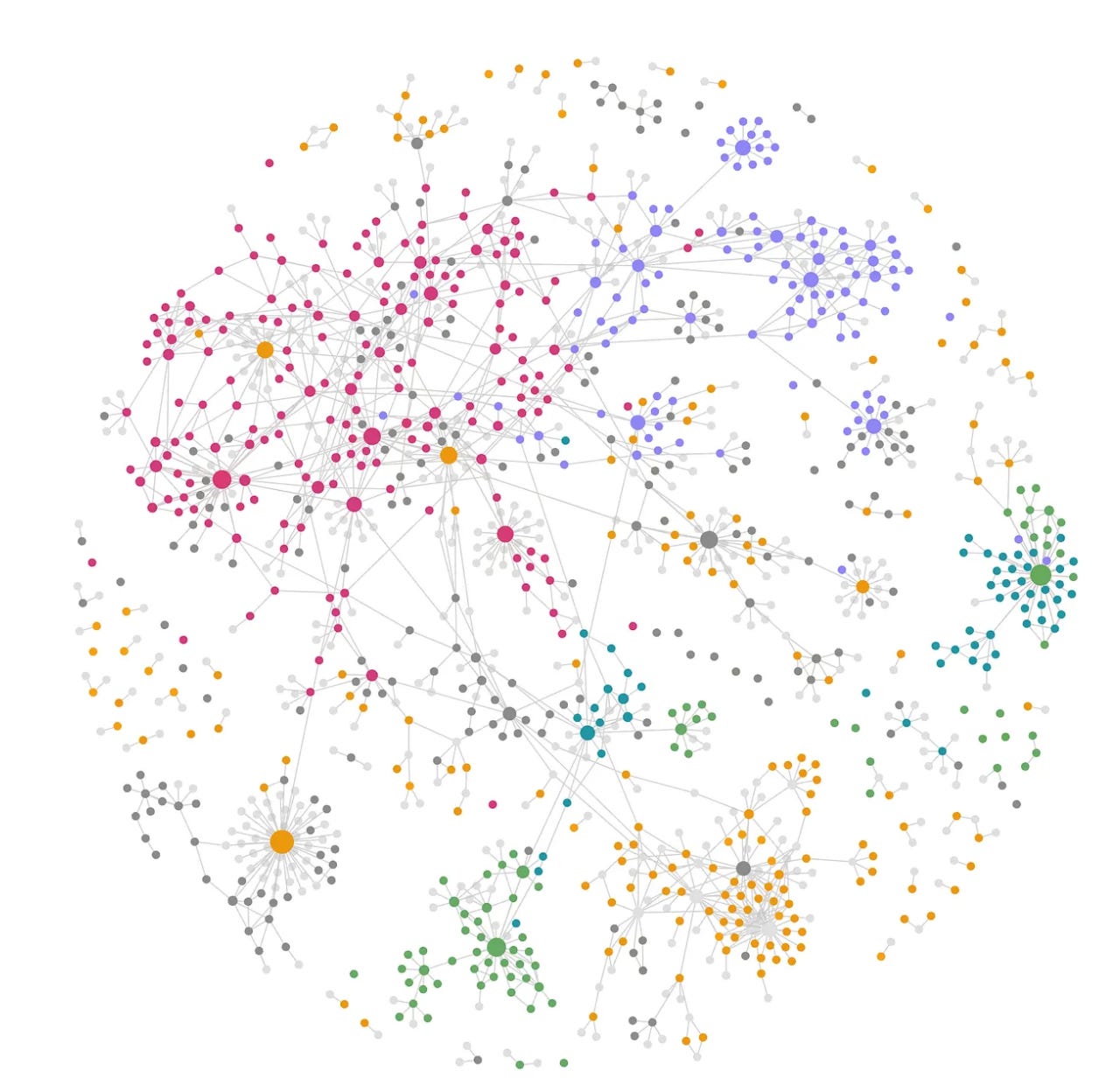
My custom harness knows everything about it through a CLAUDE.md file that specifies how the vault is structured, what’s in each section and how to read from and write to it.
One of its most important blocks is the perfect segue into the next section.
The split is deliberate. Everything outside
Workbench/—03 Projects/,04 Areas/,05 Learning/,01 Journal/— is Ángel’s own note-taking, not a shared workbench. Read those folders when he points at one or when needed; do not sweep them by default, and do not treat a Workbench area and its same-named vault folder as duplicates to merge. The names overlap because both cover his life; the two serve different readers.
2. The agentic workbench
Inside the vault there is a special folder tree. You can see it in the screenshot above, marked with a ninja icon.
While the rest of the library of docs and notes is used by me and consulted only when needed by agents, this is where all my sessions with them start, where their context and instructions live and where the outcomes they produce land.
It is called Workbench and, as the name suggests, it is the desk I share with the machines.
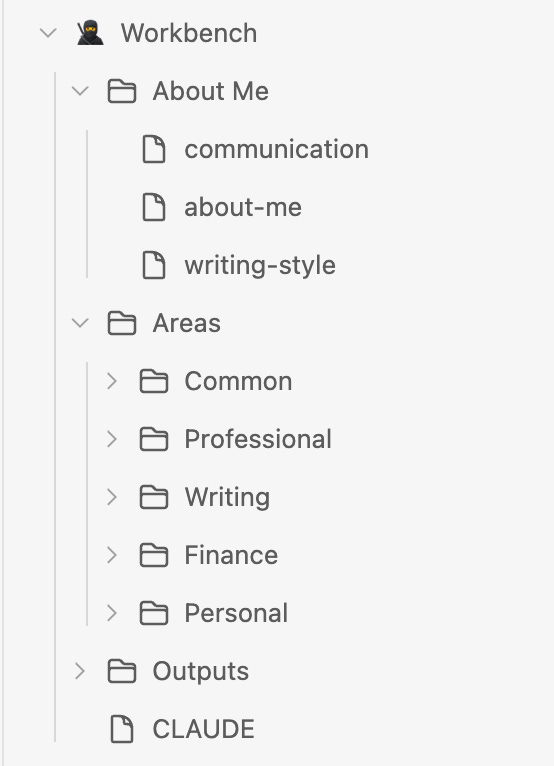
The About Me folder holds specific information about me across different dimensions of my life: family, finances, career, side projects, writing. Even wine preferences and my watch collection.
At its root, a rather detailed CLAUDE.md file with clear rules and instructions on how the Workbench is shaped, its folder protocols, what to do before every task (hint: read all the relevant context), naming conventions and other operating rules.
Its main primitive, however, is divided into two tiers. An Area is a standing domain that never finishes: finance, writing, professional, personal. A Project is a bounded effort inside one that can be called done: a research report, an app, an investment decision.
Workbench/
├── About Me/                   read-only · identity, voice, communication
├── Outputs/                    cross-area design assets (Design/, Images/)
└── Areas/<Area>/
    ├── CLAUDE.md               the area brief — loads automatically
    ├── Context/                durable area facts, kept current
    └── Projects/<Project>/
        ├── CLAUDE.md           optional — only when a project needs its own brief
        ├── Context/            material specific to this project
        └── Outputs/            the deliverables
My design of the Workbench has evolved, and it is a very personal combination of what I learned from those at the forefront.
The folder structure, maintaining consistency with the rest of the vault, loosely follows Tiago Forte’s PARA. The understanding that changing the folder rather than the model gives me a different agent comes from Kieran Klaassen at Every, and the waterfall context and instructions system is adapted from Ruben Hassid’s design.
Projects mostly hold self-contained context and instructions, while Areas use more generalized, cross-project rules and learnings graduated from project work.
The whole instruction stack has five layers: global, vault, workspace, area, project. Each loads automatically at or below its own scope.
The deepest instruction set measured costs about 12,600 tokens before the work starts: the standing tax for a session that already knows who I am and what the project is for. Worth paying when it matters.
In contrast, the rest of the vault is consulted on demand. ~10x the volume of documents, which don’t prepay in context load and are loaded only if needed.
Another thing to consider is long-term memory management. I already touched on it in a previous article of the series, where I said it is stored at the harness. Now I am saying that it lives in the library. Both are true.
Claude Code writes memories per project, into a hidden path no sync service touches. A script copies the portable ones into a folder in the vault, and sync carries them to every device and back.
3. The crossing and where this stops working
My files and notes cross from the library to the Workbench and back, all the time.
When I want to assign a job to my agents and the relevant content is on the human side of the vault, it is brought to the right area or project.
Agentic work happens at the Workbench and, when finished, the relevant output usually graduates into the library.
It’s a straightforward, clean way of working.
Now, this breaks for a business.
Searching across a connected web of plain files works for an individual because of two key conditions: the corpus has to be mostly plain text, and small enough that an agent can pick a file without drowning. Hundreds to thousands of documents.
Neither of these holds in a company. The corporate estate is hundreds of thousands to millions of PDFs, decks and spreadsheets, combined with systems of record, repos and other knowledge management systems. You can’t search inside them the way you search markdown.
For the enterprise, you need a new layer in the stack. A knowledge engine that makes your company agent-readable.
The library outlasts the bench
Part 1 of the series ended with the statement that more capable models make the instruction layer thinner and the identity and taste layers more valuable.
A better model still doesn’t know my balance sheet, my past work, or the decision I made in March and the reason I made it. That’s a record rather than a rule, and a record doesn’t shrink.
The bench gets thinner every quarter. The library only gets longer.
The Workshop Series - A tool wall for humans
Part 4: The small tools and software that make my workshop of agents pleasant to use

This series has been building upon the analogy of the Renaissance workshop as the guide to describe my personal AI agentic system. A studio of capable machines.
At the time, it seemed like the perfect metaphor for a setup that aims to provide leverage and let an individual’s judgment, taste and point of view govern more work than one person’s hands could handle.
This piece, the last of the pack, couldn’t break the pattern.
In the first article, I promised to honor the wall of small tools that didn’t make it into history books. Those that remember the finished canvases, the frescoes and the altarpieces.
They forget the rag that cleaned the brush, the string that held the line and the jars that kept the mixtures. None of them made the works but, without them, the experience to compose would have been quite miserable.
In a more practical sense, what follows is the depiction of the software and tools that make this custom agentic setup pleasant to use, and make the experience of interacting with an army of agents fast, easy and practical.
Now, this is my wall, and you will notice it is rather small. Agents have their own, much larger one. What we called their harness.
At different moments in the series, I’ve argued that the best platform for your own team of agents is a tool marketed to developers: Claude Code, Codex, OpenCode.
In the last two months, we have seen the rise of the personal agent product category. The labs launched Grok Bot from xAI in August, Muse from Meta in September and dots from OpenAI a few weeks later. Some startups have ventured into the field too. Instinct, the most prominent of all, has no app: you text or call it.
These products are easy to use, feature excellent UIs, and will continue to improve, becoming the primary gateway for bringing AI agents to the masses (Muse passed five million downloads in 22 days).
However, for AI power users - like you - Claude Code and Codex will continue to be the most stable, flexible, powerful and well-engineered base to build your own agentic workshop.
The launch coverage of these products recognized that “much of this functionality was already possible through Codex and similar agentic harnesses.” And Dan Shipper, who uses dots daily, wrote:
I use Dot for my day-to-day work, but sometimes I want to go back to good old reliable Codex. - Dan Shipper
Welcome to The Workshop Series, Part 4. The tool wall starts where the agents’ harness lives.
1. The IDE
For Claude Code or Codex as the platform, an Integrated Development Environment (IDE) is the natural workspace to interact with agents, navigate projects, run commands, inspect errors and edit files. It’s your agentic command center.
Mine is Visual Studio Code.
Not very original, but I choose it because it is flexible enough to adapt to almost any kind of work. It has a huge ecosystem of extensions, plugins and themes, supported by a large developer community, and that allows me to shape it around my own workflows instead of the other way around.
It is also particularly robust for remote work. When at the desktop, it has become the main entry point to my server-based house of agents.
Some add-ons I recommend if you decide to mirror this: Prettier (formatting on save), GitLens (who changed a line, and when), Pylance and Python, Tidy Paste (clean pastes) and vscode-pdf (PDFs without leaving the editor). For a pleasant visual experience, the One Monokai theme.
2. Terminal tools
My agents now search, browse, edit, delete and create files for me. But I need something to see them, assign work, respond and coordinate them.
That is still Herdr, the terminal multiplexer I highlighted: one window, many agents, and a sidebar that tells me which one needs me.
A possible answer to the coordination tax of many agents, and to what Kieran Klaassen (from Every) described: “It worked when I had five agents. At 10, I started forgetting.”
It is great because it survives reboots (agents included), it has a phone layout and, with plugins, you can expand its functionality. Yazi for file trees in a popup or micro, a simple text editor that accepts mouse and touch.
Other tools I use in the terminal include oh-my-zsh (gives the shell a prompt that shows the folder and git branch at a glance), lazygit (turns git into a visual panel of single keystrokes) and lazydocker (which puts all your containers on one keyboard-driven screen).
The rest of the command line is the agents’ wall, not mine. Including now, their own computer: a separate, locked user on the server runs a virtual desktop with basic software and a web browser on a persistent profile.
Command-line tools, as Andrej Karpathy put it, are what agents “can natively and easily use.”
3. Dictation
A spoken set of instructions runs far longer than a typed one, and agents do better work with more context.
Use voice dictation. You speak 3x faster than you type, and your prompts get way more detailed as a result. - Boris Cherny, creator of Claude Code
I use Monologue, a competitor to the seemingly omnipresent Wispr Flow, on the Mac, the iPhone and the iPad. Essentially everywhere.
It just works, and it has a very cool retro look. Honestly, though, I use it because it comes with my Every subscription (highly recommended for the writing alone).
How this still is a product category is beyond my comprehension, as one would assume that Apple or Google should have already built it as just a well-crafted feature. But it is what it is, and these tools, with their purpose-built models, are still ahead.
4. The Claude app
I use the Claude iOS app a lot, but rarely its Chat or Cowork screens.
My usual flow is ccr build-financial-model on the server. That names the session, gives its prompt box a color (so eight parallel agents are easy to tell apart) and turns on Remote Control. The session then appears instantly in the app’s Code view, under the same name, with a green dot.
From there, the phone works like any chatbot but with my custom agentic army on the other side, including their access to all the tooling, context, memories and workflows.
Cat Wu - from the Claude Code team - described colleagues who, every night, “plug their laptop into a power charger, open a bunch of remote control sessions, lock the screen, and then use their mobile phone from their couch.” My server is that laptop, minus the charger.
5. Other models
At work, next to Claude Code (by far the most used) and Microsoft Copilot, Visa’s GenAI platform serves as the gateway for a rich array of models.
The personal version of this, on the always-on server, is OpenRouter: one account, more than 500 models from over 80 providers. On top of it, I built Plenum, a custom plugin that lets Claude Code ask any of them, delegate work, or convene a council where they rank each other’s answers.
Claude Opus 5.5 stays the default, both because it is an awesome model and because the subscription subsidizes its use generously. Plenum is there to experiment, benchmark, compare and - also - for images, videos and audio.
That’s Rent the Frontier, Own the Stack at personal scale. The models are rented and swappable. The harness, the server and the library are mine.
Closing the loop
Five layers, five pieces: the assistants, the bench, the building, the library.
And now, the tool wall that makes the five principles that kicked off this series real:
Always-on: Herdr brings the agents back after a restart, and the timers run while I sleep.
Accessible everywhere: VS Code at the desk, Termius on the sofa, the Claude app on a coffee break.
Composable: the agents’ wall of command-line tools, and any lab’s model through OpenRouter.
Portable: the commands live in the bench, so a rebuilt box gets them back.
Robust: hooks at every gate, and a locked user for the agents’ browser.
I’m aware the market is moving the other way, toward friendly apps and message threads, and that a black terminal with white text over it still intimidates most people. A year from now, half of this wall may fit inside one app on my phone. For now, I’d rather pay the tax of a custom system.
I publish a post a week on key ideas around AI, Agents and everything around their diffusion into the enterprise and people’s lives. You can read them all here.