



Renaissance workshops had shelves full of model books: replicas, drawings, patterns and sketches that helped the team of assistants produce work that was coherent across many hands and kept the style of the master.
A version of this has persisted through centuries in different shapes.
Architecture studios, engineering shops, fashion ateliers and design firms maintain their own playbooks, design systems, pattern books and portfolios. Among other things, these help speed up the creation of new work, enforce a specific style and ensure quality through time. And people coming and going.
Naturally, the modern versions of these are digital.
Enterprises maintain a (very imperfect) set of corporate wikis, knowledge management systems, intranets, shared notes and files in random places, all in an attempt to accomplish those same goals: share knowledge, maintain consistency, ensure quality and work faster.
As you add more humans, the thing gets really messy and becomes extremely difficult to maintain. Even more so to use. So much so, that it has given birth to an entire category of B2B SaaS.
For individuals, the beginning of the decade brought a new trend from the tech-pilled and personal-productivity crowds: the second brain. A personal knowledge-management system that favored the capture and organization of information as an interconnected web so finding it and using it later was more effective.
Don’t try to remember everything. Build an external system that captures, organizes, distills, and retrieves the information you need to think and act effectively. - Tiago Forte
Again, a plethora of new software tools accompanied this new trend: Evernote, Notion and Obsidian are probably the most prominent examples.
It turns out that AI makes these concepts much more powerful.
Your agents benefit enormously from having access to an information vault they can consult and work with, especially if its items are interconnected and - somewhat - organized.
Somewhat - because current models, and modern harnesses, are very good at retrieving and making sense of seldom classified and sparse information, making it easier to actually distill the information that is useful for the job and turn it into something usable.
In simple terms, your agents are half as useful without access to a shared library.
This piece, third of the series, describes mine. What the vault actually holds and the shared desk inside it where briefs go in and outputs come out.
Welcome to The Workshop Series, Part 3.
1. The library
The vault of documents, files and notes I now share with my agents is stored in Obsidian. Synced across my devices through its native synchronization system.
Around 2,300 items now. 82 MB. Most of them, simple markdown files.
It is - roughly - organized around PARA, the structure created by Tiago Forte (the guy who formalized the second brain framework): projects, areas, resources, archives.
The idea is that you store by how actionable something is rather than by topic.
This is what it looks like in practice:
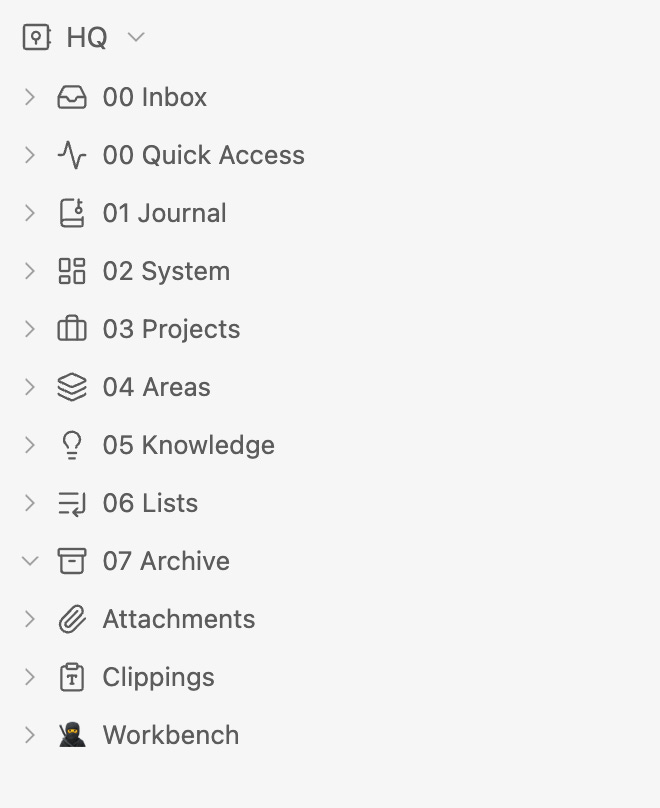
This is a system built primarily to be useful to me, from its inception to now. It turns out it is also the best shape for agents to read, write, edit and create.
I initially used Notion as my personal knowledge management system. Connecting my agents to it via its native MCP and exposed APIs.
While it’s a great product, very versatile, configurable and aesthetically pleasing, its interaction with my agentic harness is not as efficient. My agents have to continuously make calls to the tools (MCP and/or API), which introduces latency and consumes more tokens than reading or editing local files.
Obsidian works as a set of plain files and folders. Once it syncs, we humans use it through a curated interface built for us (the Obsidian app), but agents treat them as local files they can touch using plain terminal commands.
Faster, more token-efficient and less prone to errors.
It also gives agents a better sense of how the items relate to one another, because it dynamically builds a graph of all your notes as dots (nodes) and their connections as lines (edges), creating a web-like map of your entire knowledge base. Gold for your agents.
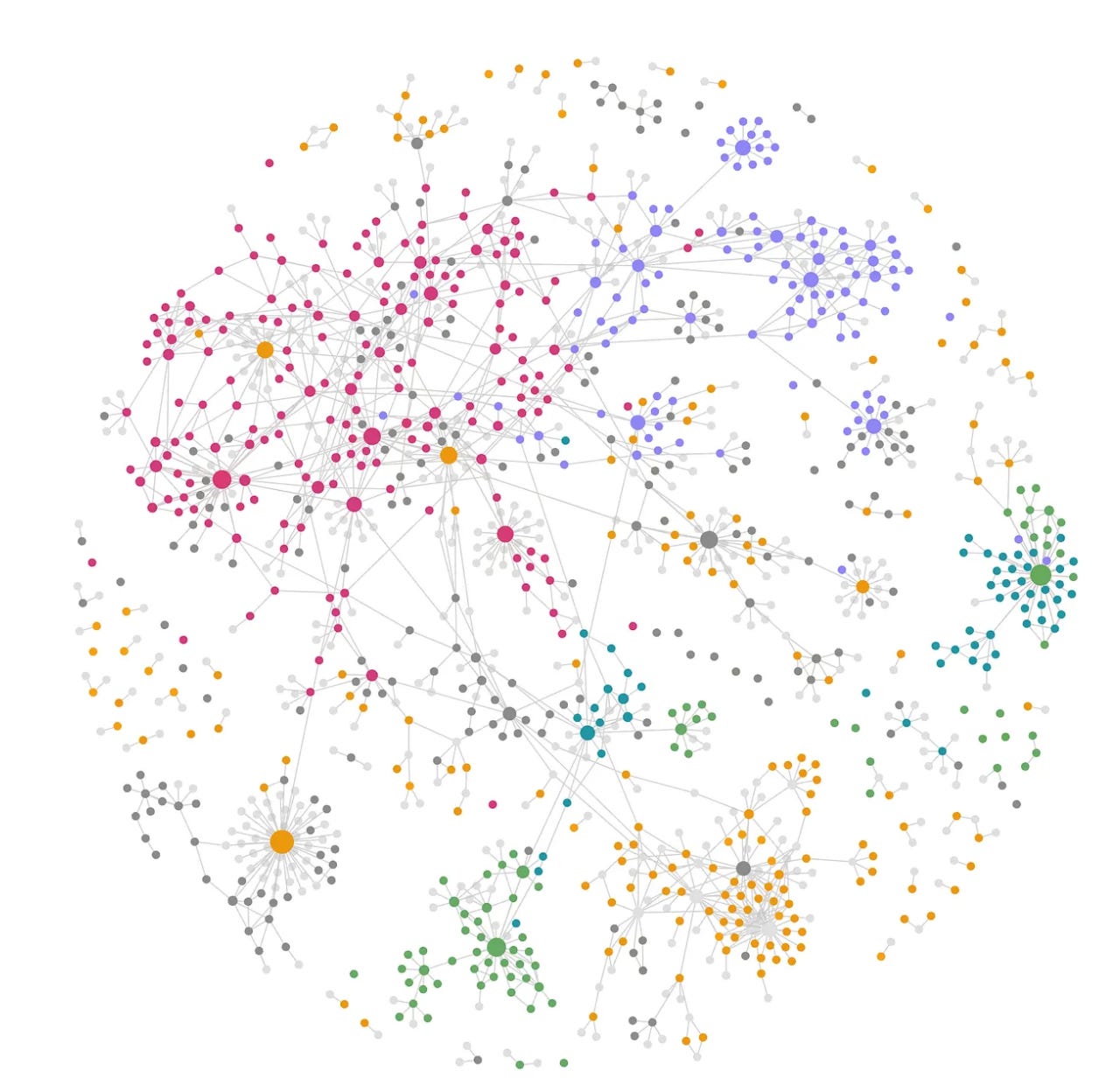
My custom harness knows everything about it through a CLAUDE.md file that specifies how the vault is structured, what’s in each section and how to read from and write to it.
One of its most important blocks is the perfect segue into the next section.
The split is deliberate. Everything outside
Workbench/—03 Projects/,04 Areas/,05 Learning/,01 Journal/— is Ángel’s own note-taking, not a shared workbench. Read those folders when he points at one or when needed; do not sweep them by default, and do not treat a Workbench area and its same-named vault folder as duplicates to merge. The names overlap because both cover his life; the two serve different readers.
2. The agentic workbench
Inside the vault there is a special folder tree. You can see it in the screenshot above, marked with a ninja icon.
While the rest of the library of docs and notes is used by me and consulted only when needed by agents, this is where all my sessions with them start, where their context and instructions live and where the outcomes they produce land.
It is called Workbench and, as the name suggests, it is the desk I share with the machines.
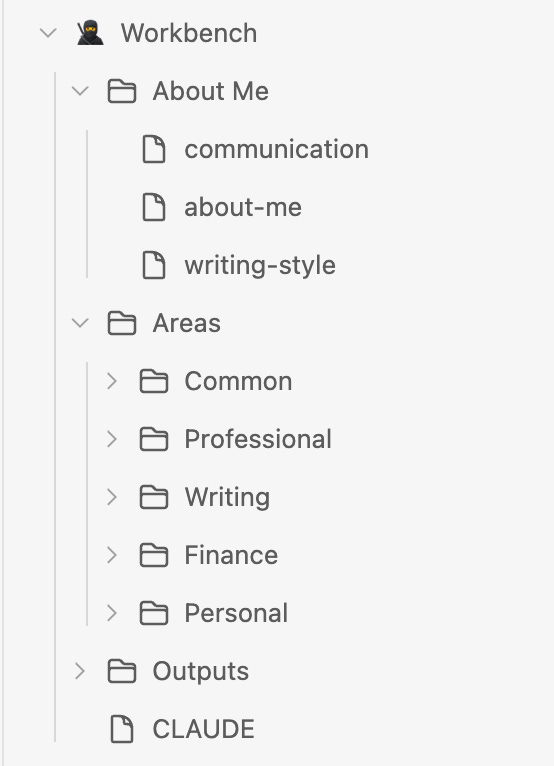
The About Me folder holds specific information about me across different dimensions of my life: family, finances, career, side projects, writing. Even wine preferences and my watch collection.
At its root, a rather detailed CLAUDE.md file with clear rules and instructions on how the Workbench is shaped, its folder protocols, what to do before every task (hint: read all the relevant context), naming conventions and other operating rules.
Its main primitive, however, is divided into two tiers. An Area is a standing domain that never finishes: finance, writing, professional, personal. A Project is a bounded effort inside one that can be called done: a research report, an app, an investment decision.
Workbench/
├── About Me/                   read-only · identity, voice, communication
├── Outputs/                    cross-area design assets (Design/, Images/)
└── Areas/<Area>/
    ├── CLAUDE.md               the area brief — loads automatically
    ├── Context/                durable area facts, kept current
    └── Projects/<Project>/
        ├── CLAUDE.md           optional — only when a project needs its own brief
        ├── Context/            material specific to this project
        └── Outputs/            the deliverables
My design of the Workbench has evolved, and it is a very personal combination of what I learned from those at the forefront.
The folder structure, maintaining consistency with the rest of the vault, loosely follows Tiago Forte’s PARA. The understanding that changing the folder rather than the model gives me a different agent comes from Kieran Klaassen at Every, and the waterfall context and instructions system is adapted from Ruben Hassid’s design.
Projects mostly hold self-contained context and instructions, while Areas use more generalized, cross-project rules and learnings graduated from project work.
The whole instruction stack has five layers: global, vault, workspace, area, project. Each loads automatically at or below its own scope.
The deepest instruction set measured costs about 12,600 tokens before the work starts: the standing tax for a session that already knows who I am and what the project is for. Worth paying when it matters.
In contrast, the rest of the vault is consulted on demand. ~10x the volume of documents, which don’t prepay in context load and are loaded only if needed.
Another thing to consider is long-term memory management. I already touched on it in a previous article of the series, where I said it is stored at the harness. Now I am saying that it lives in the library. Both are true.
Claude Code writes memories per project, into a hidden path no sync service touches. A script copies the portable ones into a folder in the vault, and sync carries them to every device and back.
3. The crossing and where this stops working
My files and notes cross from the library to the Workbench and back, all the time.
When I want to assign a job to my agents and the relevant content is on the human side of the vault, it is brought to the right area or project.
Agentic work happens at the Workbench and, when finished, the relevant output usually graduates into the library.
It’s a straightforward, clean way of working.
Now, this breaks for a business.
Searching across a connected web of plain files works for an individual because of two key conditions: the corpus has to be mostly plain text, and small enough that an agent can pick a file without drowning. Hundreds to thousands of documents.
Neither of these holds in a company. The corporate estate is hundreds of thousands to millions of PDFs, decks and spreadsheets, combined with systems of record, repos and other knowledge management systems. You can’t search inside them the way you search markdown.
For the enterprise, you need a new layer in the stack. A knowledge engine that makes your company agent-readable.
The library outlasts the bench
Part 1 of the series ended with the statement that more capable models make the instruction layer thinner and the identity and taste layers more valuable.
A better model still doesn’t know my balance sheet, my past work, or the decision I made in March and the reason I made it. That’s a record rather than a rule, and a record doesn’t shrink.
The bench gets thinner every quarter. The library only gets longer.
Next in the series: the tool wall, part four, the small tools and software that make my personal workshop of agents pleasant and easy to manage so it gets used every day.
Before you leave...
If you need help structuring your company vault and building your knowledge engine to make your business agent-readable, get in touch. The AI Labs at Visa Consulting can help you.
If you’d like to receive the specific waterfall of instructions and prompts that govern how my team of agents uses the vault, drop me a message and I will be glad to share it with you.
Finally, go ahead and comment. How do you give your agents what they need?