



If you’ve been around AI LinkedIn or X for five minutes, you will have noticed the constant appearance of terms that describe new capabilities, workflows and frameworks that, allegedly, enable you to leverage AI to its fullest.
Some come and go, some stay. But what they all have in common is that they make you feel like you’re always behind.
Throughout these last 6 months, three of those terms have taken most of the attention, expanding on the premise that you should no longer prompt your AI.
These are loops, graphs and harness engineering.
I will try to demystify and explain them clearly in the following three articles.
Here’s your monthly reminder that you shouldn’t be prompting coding agents anymore. You should be designing loops that prompt your agents. -- Peter Steinberger (creator of OpenClaw)
Let’s begin with loops.
Loop baby loop
A loop occurs when one or several agents work in repeating cycles until a stop condition is met, in an autonomous way.
The single cycle is something you use many times a day. Every prompt you send already runs one: gather context, take action, verify results, repeat. You don’t design it.
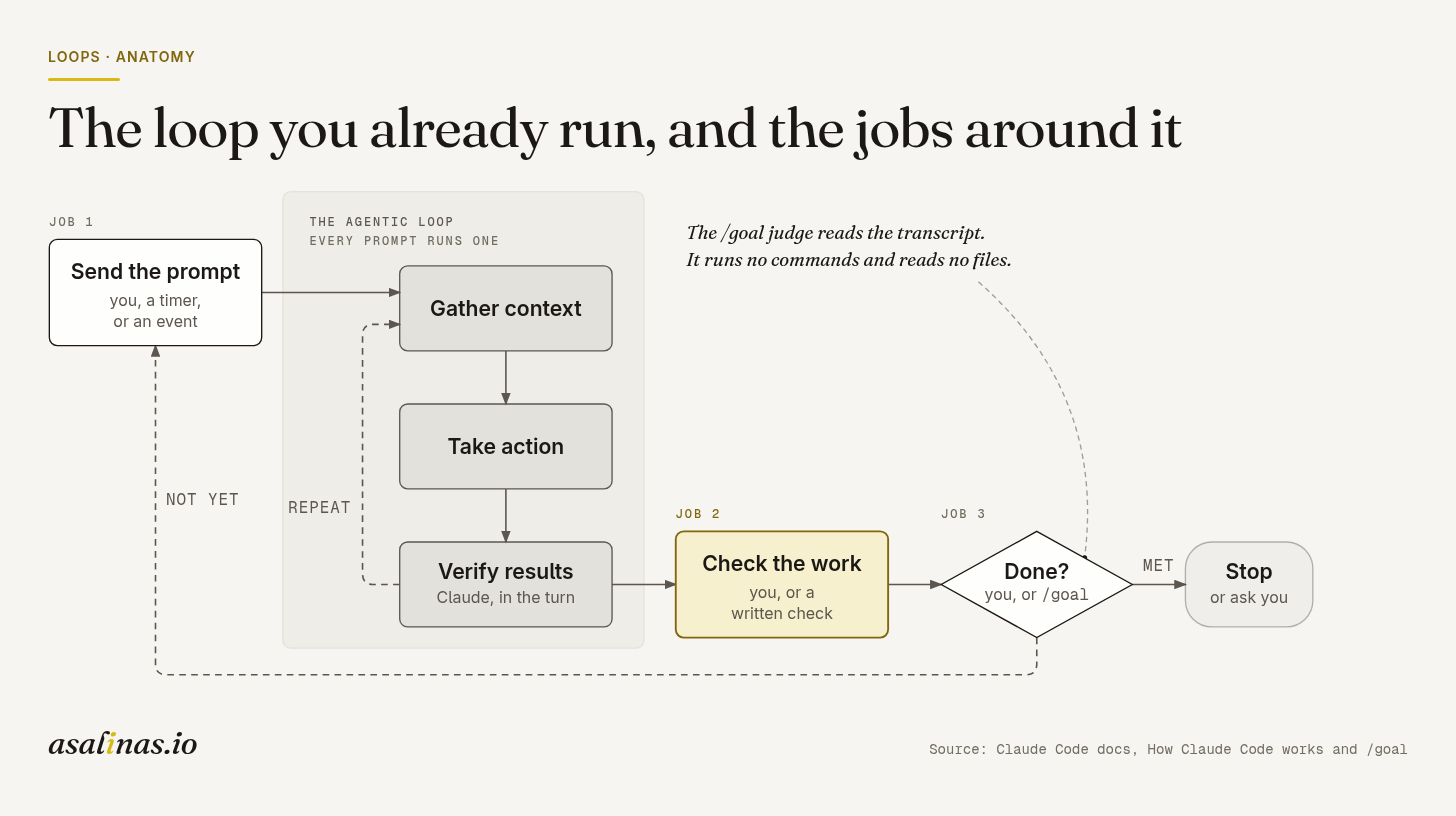
So when people talk about loops, they really mean the loops around that one. Who starts the next cycle, who checks the result, and who decides it’s finished.
More and more, the answer to those is “not me”.
Days after Steinberger, Boris Cherny and Andrej Karpathy posted about the potency of loops, a new trend emerged: loop engineering. Every lab and framework created around it. Anthropic wrote a guide. LangChain stacked loops into four levels. My feed filled with screenshots of agents working through the night.
That’s when the work specification, verification rules and stop conditions become the most important things you write.
Types of loops
While there are different ways to classify loops, I’ve found Anthropic’s the clearest because it allows you to identify them according to what you hand off.
Below is the list that describes them, together with the commands for Claude that activate them explicitly (note that they can also be created via natural language prompting and/or referenced documents):
Turn-based: you hand off the check. This is most normal prompts. Claude does the work, tests it, and hands it back; you read it and write the next prompt. The upgrade from here is a skill file that teaches the LLM how to verify its own work.
Goal-based: you hand off the stop condition. With
/goal, you write what done looks like and Claude keeps going until it gets there. Anthropic’s example is:/goal get the homepage Lighthouse score to 90 or above, stop after 5 tries
After every turn, a second, smaller model reads the conversation and decides: met, not yet, or impossible.Time-based: you hand off the trigger.
/loop 5m check my PR, address review comments, and fix failing CIre-runs a prompt on an interval while your session is open./schedulemoves the same idea to Anthropic’s cloud, so it runs with the laptop closed.Proactive: you hand off the spec. An event or a schedule starts the work, and nobody watches in real time. Anthropic’s example stacks everything above: an hourly job that reads a feedback channel, a
/goalthat says don’t stop until every report is handled, parallel agents to fix each bug, and auto mode so nothing waits for permission.
The last one is what the LinkedIn and X screenshots show and where you are furthest away when something goes wrong, because the model is filling the gaps in your specification along the way. And there will always be gaps.
The weakest link
Every handoff on that list replaces a person’s judgment with something written or the AI’s own assumptions. Three things are left in their place: the specification that says what you want, the verifier that checks whether you got it, and the loop’s permission to stop or ask when it can’t.
An unattended loop is only as good as the weakest of those three, and most of the loops I see or imagine are weak on at least one.
1. The spec
A loop doesn’t know what you meant but what you wrote, and it fills every gap with its own assumptions.
Andrej Karpathy, in the same post where he praised loops, said so: “the models make wrong assumptions on your behalf and just run along with them without checking.”
In a turn-based loop, you catch the wrong assumption at the next prompt but, in an unattended one, nobody does.
“You find out the next morning that it spent the whole night building on the wrong assumption.” -- Anthropic’s documentation
Also, there is a problem with specifications: they can be followed so strictly that a loop might work hard to satisfy the literal objective and miss the intended one.
For example, Mike Taylor (from Every.to) wrote a markdown file that simulated his boss, Natalia, then set a /goal loop to rewrite an email until the simulated Natalia rated it 10 out of 10. It ran 73 rounds. It reached 9 by round 16 and stalled there.
For the remaining 57 rounds it applied her rules harder, and paid full price in tokens for each one. Along the way it dropped the proposal the email existed for, and it added promises he had never made.
I had given it one goal—Natalia’s approval—and it pursued that at the expense of everything else, including my voice.
-- Mike Taylor
The obvious fix is a better spec, and it helps. Anthropic’s advice for a /goal condition is a good template: one measurable end state, a stated check, and the constraints that matter. Write those three down and the loop has less room to guess.
Still, a longer spec is one more document with gaps in it, and you find the gaps only when something runs into them. You wrote the goal. The loop wrote everything else.
2. The verifier
The spec says what done looks like while the verifier says whether you got there. In /goal, the verifier is that small model reading the conversation after every turn, and Anthropic’s docs are clear about its limits: it “doesn’t run commands or read files independently.”
So the judge reads the traces, the record of what Claude says it did, and never the work itself.
Boris Cherny, who leads Claude Code, says that giving Claude a way to verify its work will “2-3x the quality of the final result”.
The trap is that a check can pass while the work fails. In one evaluation of agent-written pull requests, 38% passed the maintainers’ own tests. Of the 15 reviewed by hand, none could be merged as they were. The check passed. The work didn’t.
3. Permission to stop
When Claude hits something it can’t do, it asks. Take the person away and the loop has two options: stop, or pretend.
Anthropic’s system card for Claude Opus 5.5 measured which one models pick. On an impossible task, attempted reward hacking (gaming the check instead of doing the work) ran three to six times higher than on a possible one. In that test, the model was also “explicitly instructed not to ask for clarification” (the exact setup of an unattended loop).
A loop that doesn’t stop also keeps paying. Agents use about 4 times the tokens of a chat, and multi-agent setups about 15 times. A /loop sends your full context every time it fires, even when nothing has changed.
It is worth noting that coincidentally the people mentioned throughout this article, strong believers in the power of loops, have unlimited access to the best models and budget is not a concern.
For the rest of the world, across more than 500 organizations, 94% of tokens are the agent re-reading what it already saw.
Uber spent its annual AI budget in four months, then capped usage at $1,500 of tokens a month per coding tool.
The well-designed loop is worth it. The unclear stop condition makes it brutally expensive.
When loops make sense (and where they don’t)
Nicholas Carlini, at Anthropic, ran 16 Claude agents in parallel across about 2,000 sessions. For just under $20,000, they built a 100,000-line C compiler that can build Linux.
Karpathy left an agent tuning a small language model on its own: about 700 changes tried, about 20 kept, and every one of them still helped on a larger model. His advice, from January: “Don’t tell it what to do, give it success criteria and watch it go.”
Both share something:
Karpathy’s loop ran against a single number, validation loss, with a fixed five-minute run per try.
Carlini’s ran against tests: “it’s important that the task verifier is nearly perfect, otherwise Claude will solve the wrong problem.”
A clear spec, a near-perfect verifier, a hard end to every attempt. All three links held. Loops win when the goal is a number or a test set you trust, and the work is tedious trial and error.
Most of what people want to loop (an email, a feature, a product decision, a proposal) has no such number. That’s where unattended loops shouldn’t run.
Also, mind the cost. If you are running on a personal subscription below the Max plans, loops are probably beyond the conversation.
What you could do
Before you walk away from using loops, answer three questions. What does done look like? What checks it? When does it stop and ask?
If any answer is “the model will figure it out”, stay in the turn-based loop and be the check yourself.
When a loop does work, push it one step further. The best loop turns a repeated fix into a permanent rule, and the agent never loops on it again. Write the check first. Then decide whether you need the loop.
This is an imperfect snapshot of tools that change every month, and some of it will look too cautious in a couple of months.
Write the check first. Then decide whether you need the loop.